<!DOCTYPE html>
	<html lang="vi" xmlns="http://www.w3.org/1999/xhtml" prefix="og: http://ogp.me/ns#">
	<head>
<title>Hướng dẫn nhập Phiếu đăng ký dự thi tốt nghiệp THPT trực tuyến</title>
<meta name="description" content="Hướng dẫn nhập Phiếu đăng ký dự thi tốt nghiệp THPT trực tuyến - Savefile - Tin Tức -...">
<meta name="author" content="Trường THPT Nam Lương Sơn, Lương Sơn, Hoà Bình">
<meta name="copyright" content="Trường THPT Nam Lương Sơn, Lương Sơn, Hoà Bình [admin@namluongson.edu.vn]">
<meta name="generator" content="NukeViet v4.4">
<meta name="viewport" content="width=device-width, initial-scale=1">
<meta http-equiv="Content-Type" content="text/html; charset=utf-8">
<meta property="og:title" content="Hướng dẫn nhập Phiếu đăng ký dự thi tốt nghiệp THPT trực tuyến">
<meta property="og:type" content="website">
<meta property="og:description" content="Savefile - Tin Tức - https&#x3A;&#x002F;&#x002F;namluongson.edu.vn&#x002F;savefile&#x002F;tin-tuc&#x002F;huong-dan-nhap-phieu-dang-ky-du-thi-tot-nghiep-thpt-truc-tuyen-128.html">
<meta property="og:site_name" content="Trường THPT Nam Lương Sơn, Lương Sơn, Hoà Bình">
<meta property="og:url" content="https://namluongson.edu.vn/tin-tuc/huong-dan-nhap-phieu-dang-ky-du-thi-tot-nghiep-thpt-truc-tuyen-128.html">
<link rel="shortcut icon" href="https://namluongson.edu.vn/uploads/logo_1.png">
<link rel="canonical" href="https://namluongson.edu.vn/tin-tuc/huong-dan-nhap-phieu-dang-ky-du-thi-tot-nghiep-thpt-truc-tuyen-128.html">
<link rel="alternate" href="https://namluongson.edu.vn/rss/" title="Tin Tức" type="application/rss+xml">
<link rel="alternate" href="https://namluongson.edu.vn/rss/thong-bao-cua-nha-truong/" title="Tin Tức - Thông báo của nhà trường" type="application/rss+xml">
<link rel="alternate" href="https://namluongson.edu.vn/rss/tin-tuc/" title="Tin Tức - Tin tức" type="application/rss+xml">
<link rel="alternate" href="https://namluongson.edu.vn/rss/hoat-dong-day-va-hoc/" title="Tin Tức - Hoạt động Dạy và Học" type="application/rss+xml">
<link rel="alternate" href="https://namluongson.edu.vn/rss/doan-the-15/" title="Tin Tức - Đoàn thể" type="application/rss+xml">
<link rel="alternate" href="https://namluongson.edu.vn/rss/cong-doan/" title="Tin Tức - Công đoàn" type="application/rss+xml">
<link rel="alternate" href="https://namluongson.edu.vn/rss/chu-thap-do/" title="Tin Tức - Chữ thập đỏ" type="application/rss+xml">
<link rel="alternate" href="https://namluongson.edu.vn/rss/doan-thanh-nien/" title="Tin Tức - Đoàn thanh niên" type="application/rss+xml">
<link rel="alternate" href="https://namluongson.edu.vn/rss/ngoai-khoa-16/" title="Tin Tức - HĐ Trải nghiệm - Ngoại khoá" type="application/rss+xml">
<link rel="alternate" href="https://namluongson.edu.vn/rss/tuyen-sinh-huong-nghiep/" title="Tin Tức - Tuyển sinh - Hướng nghiệp" type="application/rss+xml">
<link rel="preload" as="script" href="https://namluongson.edu.vn/assets/js/jquery/jquery.min.js">
<link rel="preload" as="script" href="https://namluongson.edu.vn/assets/js/language/vi.js">
<link rel="preload" as="script" href="https://namluongson.edu.vn/assets/js/global.js">
<link rel="preload" as="script" href="https://namluongson.edu.vn/themes/default/js/news.js">
<link rel="preload" as="script" href="https://namluongson.edu.vn/assets/js/jquery/jquery.cookie.js">
<link rel="preload" as="script" href="https://namluongson.edu.vn/themes/egov/js/main.js">
<link rel="preload" as="script" href="https://namluongson.edu.vn/themes/egov/js/custom.js">
<link rel="preload" as="script" href="https://namluongson.edu.vn/themes/egov/js/bootstrap.min.js">
<link rel="StyleSheet" href="https://namluongson.edu.vn/assets/css/font-awesome.min.css">
<link rel="StyleSheet" href="https://namluongson.edu.vn/themes/egov/css/bootstrap.min.css">
<link rel="StyleSheet" href="https://namluongson.edu.vn/themes/egov/css/style.css">
<link rel="StyleSheet" href="https://namluongson.edu.vn/themes/egov/css/style.responsive.css">
<link rel="StyleSheet" href="https://namluongson.edu.vn/themes/egov/css/custom.css">
<link rel="StyleSheet" href="https://namluongson.edu.vn/themes/egov/css/style-light-brown.css">
<link rel="StyleSheet" href="https://namluongson.edu.vn/themes/egov/css/news.css">
<style>
	body{background: #fff;}
</style>
	</head>
	<body>
<div id="print">
	<div id="hd_print">
		<h2 class="pull-left">Trường THPT Nam Lương Sơn, Lương Sơn, Hoà Bình</h2>
		<p class="pull-right"><a title="Trường THPT Nam Lương Sơn, Lương Sơn, Hoà Bình" href="https://namluongson.edu.vn/">https://namluongson.edu.vn</a></p>
	</div>
	<div class="clear"></div>
	<hr />
	<div id="content">
		<h1>Hướng dẫn nhập Phiếu đăng ký dự thi tốt nghiệp THPT trực tuyến</h1>
		<ul class="list-inline">
			<li>Thứ tư - 26/04/2023 23:03</li>
			<li class="hidden-print txtrequired"><em class="fa fa-print">&nbsp;</em><a title="In ra" href="javascript:;" onclick="window.print()">In ra</a></li>
			<li class="hidden-print txtrequired"><em class="fa fa-power-off">&nbsp;</em><a title="Đóng cửa sổ này" href="javascript:;" onclick="window.close()">Đóng cửa sổ này</a></li>
		</ul>
		<div class="clear"></div>
		<div id="hometext">
			GD&TĐ - Bộ GD&ĐT hướng dẫn thí sinh các bước nhập Phiếu đăng ký dự thi tốt nghiệp THPT trực tuyến.
		</div>
		<div id="bodytext" class="clearfix">
			<table>
	<tbody>
		<tr>
			<td><img alt="Ảnh minh họa/ITN." cms-photo-caption="Ảnh minh họa/ITN." src="https://photo-cms-giaoducthoidai.epicdn.me/w820/Uploaded/2023/uobunua/2023_04_26/dang-ky-du-thi-truc-tuyen-5521.jpg" /></td>
		</tr>
		<tr>
			<td>Ảnh minh họa/ITN.</td>
		</tr>
	</tbody>
</table>

<h1>Đăng nhập bằng tài khoản điểm tiếp nhận cung cấp để nhập phiếu đăng ký</h1>

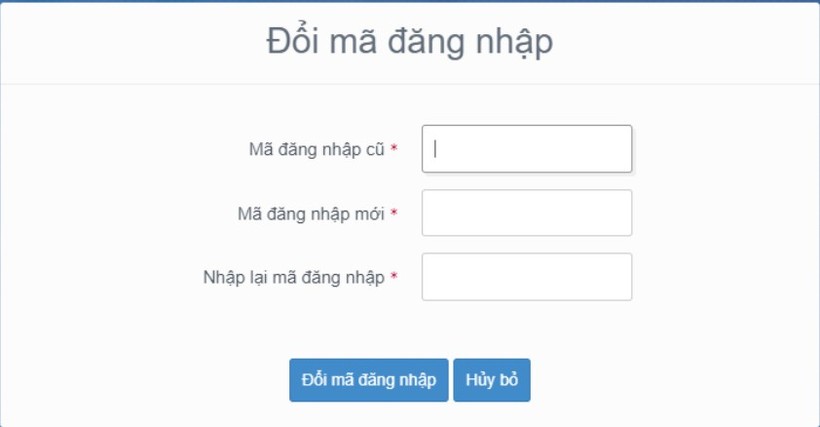
<p><em>Bước 1:</em>&nbsp;Thí sinh đăng nhập bằng chứng minh thư và mã đăng nhập (mật khẩu) mà điểm tiếp nhận hồ sơ cung cấp hoặc trong mail đã nhận. Sau khi đăng nhập, màn hình đổi mã đăng nhập sẽ được hiển thị. Thí sinh thực hiện đổi mã đăng nhập (đổi mật khẩu).</p>

<p>Mật khẩu thay đổi phải đảm bảo là mật khẩu mạnh: gồm ít nhất 8 ký tự, bao gồm cả ký tự số, ký chữ đặc biệt, ký tự in hoa, ký tự in thường.&nbsp;</p>

<p><em>Bước 2:</em>&nbsp;Sau khi đổi mã đăng nhập thành công, màn hình nhập phiếu đăng ký trực tuyến hiển thị. Thí sinh nhập các thông tin trên phiếu đăng ký.</p>

<table>
	<tbody>
		<tr>
			<td><img alt="Hướng dẫn nhập Phiếu đăng ký dự thi tốt nghiệp THPT trực tuyến ảnh 1" data-height="438" data-image-id="122126" data-photo-original-src="" data-src="https://photo-cms-giaoducthoidai.epicdn.me/w820/Uploaded/2023/uobunua/2023_04_26/screenhunter-1092-apr-26-1618-6220.jpg" data-width="842" src="https://photo-cms-giaoducthoidai.epicdn.me/w820/Uploaded/2023/uobunua/2023_04_26/screenhunter-1092-apr-26-1618-6220.jpg" /></td>
		</tr>
	</tbody>
</table>

<p>Lưu ý, với mục ảnh: Ảnh chỉ nhận các định dạng ‘jpg’, ‘jpeg’. Ảnh tải lên tại mục này là ảnh thẻ. Thí sinh khi chụp ảnh thẻ tại quán có thể xin lại file ảnh để tải lên tại mục này.&nbsp;</p>

<p>Mục 5. Nơi/hộ khẩu thường trú: Nếu thí sinh đã biết mã Tỉnh (TP), Quận (Huyện), Xã (Phường) (đối với thuộc xã khó khăn, đặc biệt khó khăn) thì có thể nhập trực tiếp vào các ô. Nếu thí sinh chưa biết mã Tỉnh (TP), Quận (Huyện), Xã (Phường) thì nhấn vào nút biểu tượng tìm kiếm.</p>

<p>Màn hình tìm kiếm hộ khẩu thường trú hiển thị. Thí sinh nhấn vào các ô để chọn Tỉnh (TP), Quận (Huyện), Xã (Phường) (đối với thuộc xã khó khăn, đặc biệt khó khăn), sau đó nhấn chọn.</p>

<p>Mục 6. Nơi học THPT hoặc tương đương: Nếu thí sinh đã biết mã Tỉnh (TP) và trường THPT thì có thể điền trực tiếp vào ô Tỉnh (TP) và trường THPT. Nếu thí sinh không biết mã Tỉnh (TP) và trường THPT thì thí sinh click vào nút biểu tượng tìm kiếm.</p>

<p>Màn hình tìm kiếm Tỉnh (TP) hoặc trường THPT hiển thị. Thí sinh nhấn vào các ô để chọn Tỉnh (TP) hoặc trường THPT, sau đó nhấn Chọn.</p>

<p><em>Bước 3:</em>&nbsp;Nhấn nút lưu phiếu đăng ký để lưu thông tin phiếu đăng ký.</p>

<table>
	<tbody>
		<tr>
			<td><img alt="Hướng dẫn nhập Phiếu đăng ký dự thi tốt nghiệp THPT trực tuyến ảnh 2" data-height="458" data-image-id="122127" data-photo-original-src="" data-src="https://photo-cms-giaoducthoidai.epicdn.me/w820/Uploaded/2023/uobunua/2023_04_26/screenhunter-1093-apr-26-1619-4898.jpg" data-width="754" src="https://photo-cms-giaoducthoidai.epicdn.me/w820/Uploaded/2023/uobunua/2023_04_26/screenhunter-1093-apr-26-1619-4898.jpg" /></td>
		</tr>
	</tbody>
</table>

<h1>Đăng nhập bằng dịch vụ công sau đó nhập phiếu đăng ký</h1>

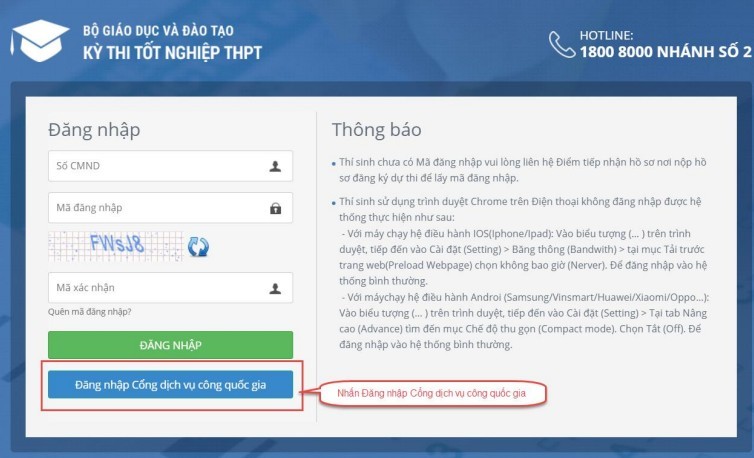
<p><em>Bước 1:</em>&nbsp;Nhấn nút Đăng nhập Cổng dịch vụ công quốc gia.</p>

<p><em>Bước 2:</em>&nbsp;Nếu đã có tài khoản dịch vụ công quốc gia thì thực hiện đăng nhập, nếu chưa có thì nhấn vào Đăng ký.</p>

<p><em>Bước 3:</em>&nbsp;Nhấn Thuê bao di động.</p>

<p><em>Bước 4:</em>&nbsp;Nhập các thông tin sau đó nhấn Đăng ký.</p>

<p><em>Bước 5:&nbsp;</em>Sau khi đăng nhập màn hình nhập Phiếu đăng ký hiển thị, thực hiện nhập các thông tin.</p>

<p>Lưu ý, với mục ảnh: Ảnh chỉ nhận các định dạng ‘jpg’, ‘jpeg’. Ảnh tải lên tại mục này là ảnh thẻ. Thí sinh khi chụp ảnh thẻ tại quán có thể xin lại file ảnh để tải lên tại mục này.&nbsp;</p>

<p>Mục 5. Nơi/hộ khẩu thường trú: Nếu thí sinh đã biết mã Tỉnh (TP), Quận (Huyện), Xã (Phường) (đối với thuộc xã khó khăn, đặc biệt khó khăn) thì có thể nhập trực tiếp vào các ô. Nếu thí sinh chưa biết mã Tỉnh (TP), Quận (Huyện), Xã (Phường) thì thí sinh nhấn vào nút biểu tượng tìm kiếm.</p>

<p>Màn hình tìm kiếm hộ khẩu thường trú hiển thị. Thí sinh nhấn vào các ô để chọn Tỉnh (TP), Quận (Huyện), Xã (Phường) (đối với thuộc xã khó khăn, đặc biệt khó khăn), sau đó nhấn chọn.</p>

<p>Mục 6. Nơi học THPT hoặc tương đương: Nếu thí sinh đã biết mã Tỉnh (TP) và trường THPT thì có thể điền trực tiếp vào ô Tỉnh (TP) và trường THPT. Nếu thí sinh không biết mã Tỉnh (TP) và trường THPT thì click vào nút biểu tượng tìm kiếm</p>

<p>Màn hình tìm kiếm Tỉnh (TP) hoặc trường THPT hiển thị. Thí sinh nhấn vào các ô để chọn Tỉnh (TP) hoặc trường THPT, sau đó nhấn Chọn.</p>

<p><em>Bước 6:</em>&nbsp;Nhấn nút Lưu phiếu đăng ký để lưu thông tin đăng ký.</p>

<table>
	<tbody>
		<tr>
			<td><img alt="Hướng dẫn nhập Phiếu đăng ký dự thi tốt nghiệp THPT trực tuyến ảnh 3" data-height="313" data-image-id="122125" data-photo-original-src="" data-src="https://photo-cms-giaoducthoidai.epicdn.me/w820/Uploaded/2023/uobunua/2023_04_26/screenhunter-1091-apr-26-1617-2762.jpg" data-width="781" src="https://photo-cms-giaoducthoidai.epicdn.me/w820/Uploaded/2023/uobunua/2023_04_26/screenhunter-1091-apr-26-1617-2762.jpg" /></td>
		</tr>
	</tbody>
</table>

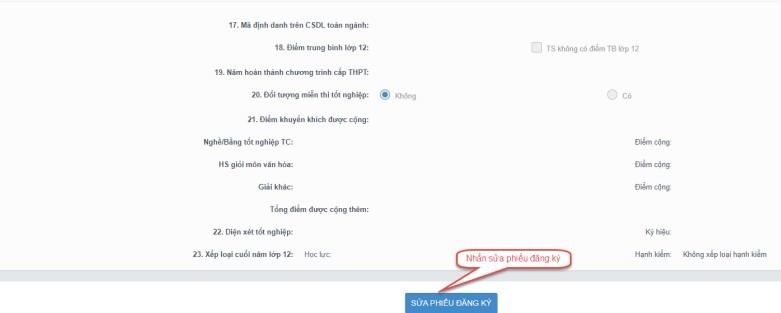
<h1>Sửa phiếu đăng ký&nbsp;</h1>

<p>Với việc sửa phiếu đăng ký khi điểm tiếp nhận chưa vào duyệt, thí sinh thực hiện 2 bước như sau:</p>

<p><em>Bước 1:</em>&nbsp;Thí sinh đăng nhập tài khoản, chọn Phiếu đăng ký =&gt; Chi tiết phiếu đăng ký=&gt; Nhấn sửa phiếu đăng ký.</p>

<p><em>Bước 2:</em>&nbsp;Sửa các thông tin, nhấn cập nhật phiếu đăng ký.</p>

<p>Với sửa phiếu đăng ký khi điểm tiếp nhận từ chối duyệt, thí sinh cũng thực hiện qua 2 bước.</p>

<p><em>Bước 1:&nbsp;</em>Thí sinh đăng nhập vào tài khoản, hiển thị popup thông báo từ chối duyệt có hiển thị nội dung từ chối duyệt. Nhấn cập nhật PĐK.</p>

<p><em>Bước 2:</em>&nbsp;Sửa các thông tin, nhấn Cập nhật phiếu đăng ký để lưu các thông tin vừa sửa.</p>

<p>Thí sinh bắt đầu đăng ký thử dự thi Tốt nghiệp THPT từ 7h ngày 26/4 đến 17h ngày 30/4. Sau thời gian này dữ liệu phiếu đăng ký sẽ bị xoá để phục vụ triển khai chính thức từ ngày 4/5 đến 17h ngày 13/5.</p>
		</div>
				<div id="author">
						<p>
				<strong>Nguồn tin:</strong>
				Giáo dục thời đại
			</p>
		</div>
	</div>
	<div id="footer" class="clearfix">
		<div id="url">
			<strong>URL của bản tin này: </strong><a href="https://namluongson.edu.vn/tin-tuc/huong-dan-nhap-phieu-dang-ky-du-thi-tot-nghiep-thpt-truc-tuyen-128.html" title="Hướng dẫn nhập Phiếu đăng ký dự thi tốt nghiệp THPT trực tuyến">https://namluongson.edu.vn/tin-tuc/huong-dan-nhap-phieu-dang-ky-du-thi-tot-nghiep-thpt-truc-tuyen-128.html</a>

		</div>
		<div class="clear"></div>
		<div class="copyright">
			&copy; Trường THPT Nam Lương Sơn, Lương Sơn, Hoà Bình
		</div>
		<div id="contact">
			<a href="mailto:admin@namluongson.edu.vn">admin@namluongson.edu.vn</a>
		</div>
	</div>
</div>
        <div id="timeoutsess" class="chromeframe">
            Bạn đã không sử dụng Site, <a onclick="timeoutsesscancel();" href="https://namluongson.edu.vn/#">Bấm vào đây để duy trì trạng thái đăng nhập</a>. Thời gian chờ: <span id="secField"> 60 </span> giây
        </div>
        <div id="openidResult" class="nv-alert" style="display:none"></div>
        <div id="openidBt" data-result="" data-redirect=""></div>
<script src="https://namluongson.edu.vn/assets/js/jquery/jquery.min.js"></script>
<script>var nv_base_siteurl="/",nv_lang_data="vi",nv_lang_interface="vi",nv_name_variable="nv",nv_fc_variable="op",nv_lang_variable="language",nv_module_name="news",nv_func_name="savefile",nv_is_user=0, nv_my_ofs=-4,nv_my_abbr="EDT",nv_cookie_prefix="nv4",nv_check_pass_mstime=1738000,nv_area_admin=0,nv_safemode=0,theme_responsive=1,nv_is_recaptcha=0;</script>
<script src="https://namluongson.edu.vn/assets/js/language/vi.js"></script>
<script src="https://namluongson.edu.vn/assets/js/global.js"></script>
<script src="https://namluongson.edu.vn/themes/default/js/news.js"></script>
<script src="https://namluongson.edu.vn/assets/js/jquery/jquery.cookie.js"></script>
<script src="https://namluongson.edu.vn/themes/egov/js/main.js"></script>
<script src="https://namluongson.edu.vn/themes/egov/js/custom.js"></script>
<script src="https://namluongson.edu.vn/themes/egov/js/bootstrap.min.js"></script>
</body>
</html>